Microsoft Copilot for Business & Microsoft 365 – Full Features & Usage Guide

Introduction: Microsoft Copilot for Business & Microsoft 365
Artificial intelligence is rapidly becoming the foundation of modern productivity. Microsoft Copilot represents Microsoft’s most comprehensive and enterprise-ready AI initiative, designed to embed intelligent assistance directly into the tools businesses already rely on every day. Rather than introducing a separate AI platform that users must learn from scratch, Microsoft Copilot works inside Microsoft 365 applications, Windows, and enterprise systems—turning everyday work into faster, smarter, and more consistent outcomes.
This complete guide to Microsoft Copilot for Business & Microsoft 365 explains what Copilot actually is, how it works behind the scenes, its full feature set, real-world business benefits, licensing models, security considerations, and step-by-step instructions on how to use it effectively. Whether you are an individual professional, IT decision-maker, or enterprise leader, this guide will help you understand how Copilot fits into real business workflows.
What Is Microsoft Copilot? (Business Perspective)
Microsoft Copilot is an AI-powered productivity assistant built into Microsoft’s ecosystem, including Microsoft 365 apps (Word, Excel, PowerPoint, Outlook, Teams), Windows, and specialized platforms such as Copilot Studio and GitHub Copilot.
At its core, Copilot allows users to interact with software using natural language. Instead of manually writing documents, building formulas, summarizing meetings, or creating presentations, users can ask Copilot to do these tasks intelligently—while still remaining in control of the final output.
Unlike consumer AI tools, Microsoft Copilot is designed for enterprise use, meaning it respects: User identity and permissions, Organizational data boundaries, Compliance and security requirements
According to Microsoft’s official documentation, Microsoft 365 Copilot combines large language models with Microsoft Graph and Microsoft 365 apps to deliver context-aware assistance using the data users are authorized to access.
Microsoft Copilot vs Traditional AI Tools: Why the Difference Is Strategic, Not Cosmetic
Many organizations initially assume Microsoft Copilot is simply another AI chatbot layered onto productivity tools. This assumption is understandable—but it is also dangerously incomplete.
The reality is that Microsoft Copilot represents a structural shift in how AI is embedded into enterprise workflows, governance models, and security architectures.
To understand why, we need to examine how traditional AI tools operate—and where they fundamentally fall short for business use.
Limitations of Traditional AI Tools in Business Environments
Most traditional AI tools—including generic chatbots and standalone AI platforms—were created with individual productivity and experimentation in mind. While they may be impressive in isolated use cases, they were not architected for enterprise operations, where security, governance, compliance, and contextual accuracy are non-negotiable.
This design gap becomes increasingly visible as organizations attempt to scale AI beyond small teams.
1. Operate Outside Core Business Systems
Traditional AI tools function outside the organization’s digital ecosystem. They are not natively embedded into the systems where real work happens—such as email, document management, calendars, meetings, or collaboration platforms.
Because of this separation:The AI has no direct visibility into workflows. It cannot track dependencies between tasks or teams. It lacks awareness of business priorities and timelines
As a result, responses are: Generic rather than organization-specific. Based on assumptions instead of operational reality. Disconnected from actual business objectives
In practical terms, this means the AI may be intelligent in isolation, but it is structurally uninformed about how your organization works.
2. No Understanding of Internal Documents or Meetings
Standalone AI tools cannot naturally access or interpret internal organizational knowledge, including:
Internal Word, Excel, or PowerPoint documents. Outlook emails and calendar events. Teams chats and meeting transcripts. SharePoint or OneDrive repositories
Any form of “understanding” requires manual intervention—users must decide what to copy, paste, or upload.
This leads to several systemic problems:
Fragmented context (AI sees only partial information). Inconsistent results depending on what each user provides. Repetition of effort across teams. No persistent organizational memory
The AI never builds a holistic view of the organization. Instead, it reacts only to isolated fragments of information, which limits accuracy, relevance, and reliability.
3. Risky Copy-Paste Workflows with Sensitive Data
To extract value from traditional AI tools, users often resort to risky workflows such as:
Copying internal documents into external tools. Pasting confidential emails or financial data. Uploading proprietary files to third-party platforms
These practices introduce serious enterprise risks:
Data leakage beyond organizational boundaries. Loss of audit trails and traceability. Potential violations of GDPR, ISO, SOC, or industry regulations. Growth of shadow IT, where employees bypass approved systems
From a governance and compliance perspective, this model is unsustainable at scale and fundamentally incompatible with modern enterprise security requirements.
4. Lack of Enterprise Governance and Controls
Most traditional AI tools were not built with enterprise oversight in mind. They typically lack:
Role-based access control (RBAC). Identity-aware permission enforcement. Centralized compliance and policy management. Enterprise-grade logging and audit capabilities
This creates blind spots for IT, security, and compliance teams:
No clear visibility into how AI is being used. No way to enforce organizational policies. Limited ability to respond to audits or incidents
For regulated industries, government entities, or security-first organizations, this limitation alone is often a deal-breaker.
Why Microsoft Copilot Is Architecturally Different
Microsoft Copilot was designed from the ground up for enterprise environments. It is not a generic AI layered on top of business tools—it is a native extension of the Microsoft ecosystem, engineered to meet enterprise standards from day one.
1. Native Integration Inside Microsoft 365
Copilot works directly inside Microsoft 365 applications, including: Word, Excel, PowerPoint, Outlook, Teams
This native integration delivers critical advantages:
No context switching between tools. No manual uploads or copy-paste workflows. AI assistance appears exactly where work is happening
Instead of disrupting workflows, Copilot augments them in real time, turning everyday tasks into intelligent, assisted experiences.
2. Contextual Intelligence via Microsoft Graph
At the core of Copilot’s intelligence is Microsoft Graph, which provides secure, real-time contextual signals across the organization.
Microsoft Graph enables Copilot to understand:
Who you collaborate with most frequently
Which documents are relevant to your role
Which meetings, emails, and conversations matter
How projects, tasks, and timelines are connected
This shifts AI from being:
Reactive and generic
to. Context-aware and organization-specific
Copilot doesn’t just answer questions—it understands why the question matters within your business context.
3. Permission-Aware by Design (Zero Trust AI)
One of Copilot’s most critical architectural strengths is that it never bypasses security controls.
Through Microsoft Entra ID, Copilot:
Only accesses data the user is authorized to see. Respects existing document, mailbox, and site permissions. Applies identity-based access controls in real time
If a user cannot open a file manually, Copilot cannot reference it either.
This ensures AI operates within Zero Trust security principles, reinforcing trust rather than undermining it.
4. Built-In Security, Compliance, and Governance
Copilot operates under Microsoft’s enterprise security and compliance framework, including:
Data Loss Prevention (DLP) policies. Information protection and sensitivity labels
eDiscovery, auditing, and legal hold capabilities
Alignment with global standards such as ISO, SOC, and GDPR
For organizations, this means:
AI adoption without losing control. Centralized governance across users and departments. Compliance readiness built into daily workflows
AI becomes auditable, controllable, and defensible—not a risk surface.
Why This Matters for Trust, Scalability, and Long-Term ROI
The real value of Microsoft Copilot extends far beyond productivity gains. Its impact is strategic and structural.
Trust
Employees can use AI confidently, knowing sensitive data remains protected.
Governance
IT and compliance teams retain visibility, policy control, and audit readiness.
Scalability
Copilot can be deployed across teams, departments, and regions without introducing security gaps.
Strategic Alignment
AI becomes a managed capability within the digital operating model—not an unmanaged experiment.
Final Perspective
Traditional AI tools are powerful but isolated.
Microsoft Copilot is embedded, governed, and enterprise-aware.
For organizations that prioritize:
Data governance, Security, Regulatory compliance, Long-term scalability
Microsoft Copilot is not just a better chatbot—it is a foundational AI layer for modern, secure, and intelligent work.
Types of Microsoft Copilot
Microsoft 365 Copilot is the most widely adopted and strategically important Copilot offering for organizations. Unlike standalone AI tools, it is natively embedded inside everyday Microsoft 365 applications, fundamentally transforming how employees write, analyze, communicate, and collaborate—without forcing them to change how they work.
Because Copilot operates directly within familiar tools, organizations see immediate productivity gains while significantly reducing disruption, user resistance, and training overhead.
What Microsoft 365 Copilot Actually Does
Microsoft 365 Copilot acts as an AI-powered work companion, supporting the entire lifecycle of business tasks—from content creation to data analysis to communication and collaboration.
1. Drafts and Rewrites Business Documents in Word
Inside Microsoft Word, Copilot transforms document creation from a manual, time-consuming process into an assisted, intelligent workflow.
Draft reports, proposals, policies, and contracts from simple prompts
Copilot can generate first drafts based on short instructions such as goals, audience, or document type. This eliminates blank-page anxiety and accelerates document creation, especially for recurring formats like reports, SOPs, and proposals.
Rewrite content to be more concise, professional, or persuasive
Existing documents can be refined instantly. Copilot can simplify complex language, enhance professionalism, or strengthen persuasive tone—without altering the core meaning.
Adjust tone for executives, customers, or technical audiences
Copilot adapts language and structure depending on who will read the document, ensuring clarity and appropriateness across leadership, clients, or technical teams.
Summarize long documents into clear executive briefs
Lengthy documents can be condensed into concise summaries that highlight key points, decisions, and recommendations—ideal for leadership review and faster decision-making.
Business impact:
Employees start with structured, context-aware drafts, reducing writing time while improving consistency, clarity, and overall document quality.
2. Analyzes Data and Explains Insights in Excel
In Microsoft Excel, Copilot closes the gap between raw data and business insight.
Analyze large datasets using natural language questions
Users can ask questions like “What trends do you see this quarter?” or “Why did revenue drop in July?”—without writing complex formulas.
Identify trends, outliers, and correlations automatically
Copilot scans datasets to surface hidden patterns, anomalies, and relationships that may be overlooked in manual analysis.
Explain results in plain business language
Instead of technical outputs, Copilot translates findings into clear explanations that business users can understand and act on.
Generate formulas, tables, and visualizations on demand
Copilot creates formulas, PivotTables, and charts automatically, reducing dependency on advanced Excel skills.
Business impact:
Non-technical users gain analytical confidence, while analysts work faster and focus on strategic interpretation rather than manual data preparation.
3. Builds Structured Presentations in PowerPoint
With Microsoft PowerPoint, Copilot turns ideas and content into polished presentations.
Create complete slide decks from Word files or prompts
Copilot converts documents or simple outlines into fully structured slide decks with logical flow.
Structure narratives with clear story flow
It organizes content into introductions, key points, supporting evidence, and conclusions—improving message clarity.
Generate speaker notes and summaries
Presenters receive ready-made talking points, improving delivery and confidence.
Adapt presentations for different audiences or time limits
Copilot can shorten decks, simplify messaging, or tailor content for executives, clients, or internal teams.
Business impact:
Time spent on slide creation drops dramatically, while presentation quality, consistency, and storytelling improve.
4. Summarizes Email Threads and Drafts Responses in Outlook
In Microsoft Outlook, Copilot addresses one of the biggest productivity drains: email overload.
Summarize long or complex email threads
Copilot extracts key discussion points so users can understand context instantly.
Highlight key decisions, deadlines, and requests
Critical actions and commitments are clearly surfaced, reducing missed follow-ups.
Draft responses that match the user’s tone and intent
Copilot prepares replies that sound natural and professional, while users remain in control before sending.
Help users catch up quickly after time away
After leave or travel, Copilot provides fast summaries so employees can re-engage without reading every email.
Business impact:
Employees spend less time managing inboxes and more time on productive, high-value work.
5. Converts Teams Meetings into Summaries, Decisions, and Action Items
Within Microsoft Teams, Copilot ensures meetings produce outcomes, not just conversations.
Summarize meetings in real time or afterward
Participants receive concise recaps of discussions without rewatching recordings.
Identify decisions made during discussions
Copilot clearly records agreed outcomes, reducing ambiguity.
Extract action items and assign follow-ups
Tasks are captured automatically, improving accountability.
Provide recaps for participants who joined late or missed the meeting
Everyone stays aligned, regardless of attendance.
Business impact:
Meetings become structured, actionable, and measurable, improving execution and follow-through across teams.
Why Microsoft 365 Copilot Drives Faster Adoption
One of Copilot’s strongest advantages is where it lives—inside tools employees already use daily.
There is no new interface to learn
Users interact with Copilot through familiar menus and prompts.
Minimal formal training is required
Most employees learn by using Copilot naturally during daily tasks.
Adoption feels natural rather than forced
AI is perceived as help, not disruption.
Productivity gains appear immediately
Value is visible within days, not months.
Organizational impact:
Lower change-management costs, Faster ROI, Higher employee satisfaction and trust.
AI becomes an enhancement to existing workflows, not a disruptive system replacement.
Business Impact Summary
Microsoft 365 Copilot delivers enterprise-wide value by:
Reducing time spent on writing, analysis, and meetings
Routine tasks are accelerated, freeing time for higher-impact work.
Improving quality, clarity, and consistency of output
Documents, insights, presentations, and communications become more polished and reliable.
Helping employees focus on strategic and creative work
AI handles repetitive tasks so humans focus on judgment, creativity, and leadership.
Scaling AI safely within existing security and compliance frameworks
Copilot respects organizational permissions, governance, and regulatory requirements.
Final Takeaway
Microsoft 365 Copilot is not just an AI assistant—it is a productivity multiplier embedded into everyday work.
For organizations seeking:
Rapid adoption, Immediate productivity gains, Minimal training effort, Secure, enterprise-ready AI
Microsoft 365 Copilot represents the most practical and impactful entry point into AI-powered work.
Copilot in Microsoft Word
In Microsoft Word, Copilot functions as a writing, editing, and structuring partner, accelerating document-heavy workflows while improving quality and consistency.
Create documents from simple prompts
Users can start documents by describing intent rather than writing from scratch. For example, a short prompt like “Create a project status report for senior leadership” generates a structured draft with headings, professional language, and logical flow. This eliminates blank-page friction and speeds up document creation.
Rewrite text for clarity, tone, or length
Copilot refines existing content by simplifying complex language, making text more persuasive, or shortening long sections—without changing the core meaning. This is especially valuable when adapting the same content for different audiences.
Generate summaries and executive briefs
Long reports or policies can be condensed into concise summaries that highlight key points, risks, and decisions. Executives get clarity without reading dozens of pages, improving decision speed.
Structure policies, proposals, and reports
Copilot applies consistent structure to formal documents, ensuring compliance-ready layouts, logical sequencing, and professional formatting.
Business value:
Departments like HR, legal, marketing, and project management—where documentation volume is high—see faster turnaround, improved consistency, and reduced rework.
Copilot in Microsoft Excel
In Microsoft Excel, Copilot democratizes data analysis by making insights accessible to non-technical users.
Explain what data means in plain language
Instead of interpreting raw numbers, users receive clear explanations of what the data indicates, such as performance changes or risk signals.
Identify trends, anomalies, and patterns
Copilot scans datasets to surface unusual changes, emerging trends, and correlations that might otherwise go unnoticed.
Suggest formulas and calculations
Users no longer need to remember complex formulas. Copilot recommends or creates them automatically based on the question being asked.
Recommend charts and dashboards
Based on the data and context, Copilot suggests appropriate visualizations, helping users communicate insights effectively.
For example, users can simply ask:
“Which products grew fastest last quarter, and why?”
Copilot analyzes the data, explains growth drivers, and presents the findings clearly.
Business value:
This lowers the barrier to data-driven decision-making, enabling more teams—not just analysts—to use data confidently.
Copilot in Microsoft PowerPoint
With Microsoft PowerPoint, Copilot transforms ideas and content into polished, executive-ready presentations.
Create slide decks from short briefs
A short description of the topic or objective can be turned into a complete slide structure with logical flow.
Convert Word documents into slides
Copilot extracts key points from documents and converts them into slides, saving hours of manual work.
Rewrite slides for clarity and impact
Slides can be refined to be more concise, persuasive, or audience-specific, improving communication effectiveness.
Generate speaker notes
Copilot produces talking points that help presenters deliver confident, consistent messages.
Business value:
Teams dramatically reduce time spent on slide creation while improving presentation quality for executives, clients, and stakeholders.
Copilot in Microsoft Outlook
In Microsoft Outlook, Copilot addresses communication overload—one of the biggest productivity challenges in modern workplaces.
Summarize long email threads
Copilot condenses lengthy conversations into clear summaries, helping users understand context instantly.
Draft replies in different tones
Users can generate responses that are formal, concise, friendly, or assertive—while maintaining professionalism.
Highlight key requests or deadlines
Important actions, dates, and decisions are surfaced clearly, reducing the risk of missed commitments.
Business value:
Employees respond faster and more effectively, maintaining professionalism without spending excessive time in their inbox.
Why This Matters for Organizations
Across Word, Excel, PowerPoint, and Outlook, Copilot:
Reduces time spent on routine tasks
Improves clarity, consistency, and quality of output
Empowers non-technical users with advanced capabilities
Helps teams focus on strategic, creative, and decision-oriented work
Final Insight
Copilot does not replace human expertise—it amplifies it. By embedding AI directly into Microsoft 365 applications, Copilot transforms everyday work into a smarter, faster, and more effective experience without disrupting established workflows.
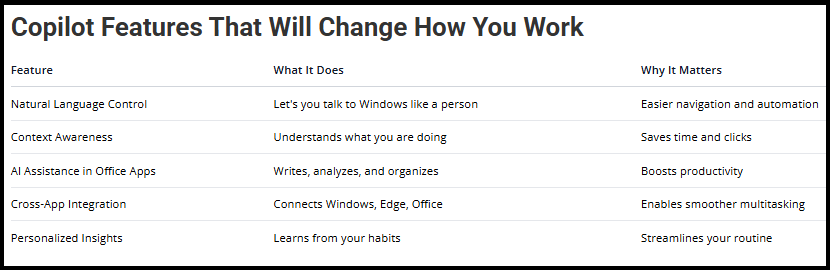
Microsoft Copilot extends beyond documents and data into collaboration and operating-system–level productivity. Two important layers of this ecosystem are Copilot in Microsoft Teams and Copilot in Windows, each serving a distinct but complementary role.
Copilot in Microsoft Teams
Within Microsoft Teams, Copilot enhances collaboration by turning conversations and meetings into structured, actionable outcomes rather than unstructured discussions.
Summarizing meetings automatically
Copilot generates concise summaries of meetings, capturing key discussion points without requiring participants to review full recordings or transcripts. This is especially valuable for long or recurring meetings, where important information can easily get buried.
Impact:
Participants can quickly understand what happened, even if they joined late or missed the meeting entirely.
Capturing decisions and next steps
Copilot identifies and records decisions made during meetings and clearly distinguishes them from open discussions. It also extracts next steps and action items, providing clarity on what was agreed and what needs to happen next.
Impact:
This reduces ambiguity, prevents misunderstandings, and improves accountability across teams.
Generating follow-up messages
After meetings, Copilot can draft follow-up messages summarizing outcomes, decisions, and assigned actions. These messages can be shared directly in Teams or via email.
Impact:
Follow-ups become consistent, timely, and complete—without requiring manual effort from meeting organizers.
Why This Matters for Remote and Hybrid Teams
For distributed teams, context loss is a major challenge. Copilot ensures:
Institutional memory of discussions, Alignment across time zones, Continuity even when team members change
Meetings become documented, searchable, and actionable, not just conversations.
Copilot in Windows (Individual Productivity Layer)
Windows Copilot operates at the operating-system level, providing AI assistance across everyday tasks on Windows devices. While it is not as deeply integrated with organizational data as Microsoft 365 Copilot, it plays an important role in personal productivity.
Drafting content
Copilot in Windows helps users quickly draft text such as notes, emails, outlines, or short documents. It supports ideation and first drafts across applications, even outside Microsoft 365.
Impact:
Users move from idea to content faster, reducing friction in everyday tasks.
Research and explanations
Users can ask Copilot questions to get explanations, summaries, or clarifications on topics without switching tools or browsers.
Impact:
This saves time and helps users stay focused, especially when they need quick understanding rather than deep analysis.
Quick productivity help
Copilot assists with everyday productivity needs such as:
Rewriting text, Summarizing information, Getting step-by-step guidance
Impact:
It acts as a digital helper for routine tasks, improving efficiency throughout the day.
Positioning of Copilot in Windows
While Copilot in Windows:
Is less connected to organizational data
Does not deeply understand internal documents or permissions
It still delivers strong value by:
Enhancing individual efficiency
Reducing task-switching
Supporting users across diverse applications
How Teams Copilot and Windows Copilot Work Together
Copilot in Teams focuses on collaboration, meetings, and shared outcomes. Copilot in Windows focuses on individual productivity and task support
Together, they create a layered AI experience:
Organizational intelligence where governance matters, Personal assistance where speed and convenience matter
Final Perspective
Copilot in Microsoft Teams ensures that collaboration leads to clarity and action, especially in remote and hybrid environments.
Copilot in Windows complements this by boosting individual productivity at the device level.
Combined with Microsoft 365 Copilot, these layers form a comprehensive AI productivity stack—supporting users from personal tasks to team collaboration to enterprise workflows, all within a secure and familiar Microsoft ecosystem.
Copilot Studio empowers organizations to move far beyond out-of-the-box AI. Instead of relying on a single, generic assistant, Copilot Studio enables companies to build, customize, and manage business-specific AI copilots (agents) that are deeply aligned with internal processes, policies, and knowledge.
These copilots operate securely within the Microsoft ecosystem and can be deployed across:
Microsoft 365, Microsoft Teams, Internal portals and intranets, Company websites and self-service platforms
This brings AI directly into day-to-day operations, where employees actually need it.
What Makes Copilot Studio Strategically Important
Most organizations do not operate on generic workflows. They have unique policies, terminology, approval paths, and compliance rules that general-purpose AI tools cannot reliably understand.
Copilot Studio closes this gap by enabling businesses to design AI that reflects how the organization really works.
Encode Organizational Knowledge into AI
Copilot Studio allows companies to ground AI agents in official internal knowledge, such as:
HR policies and employee handbooks, IT documentation and SOPs, Legal guidelines and compliance rules, Internal FAQs and process manuals
This ensures copilots provide accurate, approved, and consistent answers, rather than speculative or outdated responses.
Strategic value:
Organizational knowledge becomes searchable, conversational, and available on demand—without relying on individuals to remember where information lives.
Control How AI Behaves, Responds, and Escalates
With Copilot Studio, organizations can define:
How the AI responds to different types of questions
When it should provide guidance vs. request clarification
When issues should be escalated to human experts
How sensitive or restricted topics are handled
This transforms AI from an unpredictable chatbot into a governed digital agent that behaves in line with business expectations.
Strategic value:
AI responses become reliable, consistent, and aligned with organizational tone and risk tolerance.
Align AI Outputs with Internal Policies and Compliance Rules
Copilot Studio integrates AI with existing governance frameworks, ensuring:
Responses reflect current policies
Compliance boundaries are respected
Sensitive data is protected by permissions
Strategic value:
AI becomes safe to deploy at scale—even in regulated industries—because it operates within defined compliance guardrails.
The Result: Operational AI, Not Experimental AI
Instead of AI being a novelty or side experiment, Copilot Studio enables operational AI—AI that:
Solves real business problems, Reduces workload, Improves consistency and efficiency, Scales across the organization
What You Can Build with Copilot Studio
1. Answer HR Policy Questions
HR copilots built with Copilot Studio can:
Answer employee questions about policies and benefits
Employees can ask natural-language questions about leave entitlements, benefits, payroll cycles, attendance rules, or compliance topics—without waiting for HR responses.
Provide consistent, up-to-date answers
Because the copilot is grounded in official HR documentation, answers remain accurate and aligned with current policies.
Reduce repetitive HR queries
Common questions that consume HR time are handled automatically, freeing HR professionals for strategic people initiatives.
Business impact:
Employees get instant, 24/7 answers, while HR teams shift from reactive support to proactive talent and culture work.
2. Support IT Helpdesk Requests
IT support copilots can:
Guide users through common troubleshooting steps
Copilots can walk employees through device setup, connectivity issues, or application errors step by step.
Answer access and setup questions
Users can get help with software access, password resets, or system onboarding without opening tickets.
Route complex issues with full context
When escalation is needed, the copilot passes complete context to human IT staff, reducing back-and-forth.
Business impact:
Ticket volumes drop, resolution times improve, and IT teams focus on complex, high-value technical work instead of repetitive issues.
3. Guide Onboarding Processes
Onboarding copilots can:
Walk new hires through policies and tools
New employees receive guided explanations of company rules, tools, and workflows at their own pace.
Provide step-by-step setup guidance
Copilots assist with account setup, system access, and first-day tasks.
Answer common “first-week” questions in real time
Instead of asking managers or colleagues, new hires get instant answers.
Business impact:
New hires ramp up faster, onboarding is standardized globally, and managers spend less time repeating instructions.
4. Provide Internal Knowledge Assistance
Knowledge copilots can:
Search and summarize internal documents
Employees can ask questions instead of manually searching folders, wikis, or shared drives.
Deliver fast, relevant answers
Copilots surface the most relevant information based on context and permissions.
Reduce reliance on tribal knowledge
Critical information no longer depends on “who knows what.”
Business impact:
Knowledge silos shrink, information becomes easier to discover, and productivity improves across teams.
How Copilot Studio Works in Practice
Copilot Studio gives organizations fine-grained control over AI agents:
Define Conversation Flows and Behaviors
Organizations can design how conversations unfold, ensuring predictable and helpful interactions.
Connect to Approved Internal Data Sources
Only vetted, authorized content is used to ground AI responses.
Integrate Business Rules and Escalation Paths
Copilots follow the same rules humans do—knowing when to answer and when to escalate.
Monitor Usage, Performance, and Outcomes
Administrators can track how copilots are used, where they add value, and where improvements are needed.
Crucially:
All copilots respect existing security and permission models—users only see what they are authorized to see.
Governance, Control, and Trust
Copilot Studio is built for enterprise-grade governance, offering:
Centralized management of AI agents
All copilots are managed from a single control plane.
Version control and updates
Organizations can update knowledge, logic, and behavior without disruption.
Auditability and usage insights
Every interaction can be monitored for compliance and optimization.
Alignment with compliance requirements
AI usage aligns with internal policies and external regulations.
Result:
AI agents remain accurate, secure, compliant, and aligned with business intent over time.
Why Copilot Studio Complements Microsoft 365 Copilot
Microsoft 365 Copilot
Enhances individual productivity across documents, data, and collaboration.Copilot Studio
Enables process-specific AI agents for recurring, organization-wide scenarios.
Together, they create a layered AI strategy:
Personal productivity at the user level, Operational automation at the process level
Final Perspective
Copilot Studio transforms AI from a general assistant into a customized business capability.
For organizations aiming to:
Automate internal support, Standardize access to knowledge, Improve employee experience, Scale AI securely and strategically
Copilot Studio provides the tools to design AI around the business—rather than forcing the business to adapt to AI.
Key Features of Microsoft Copilot
Microsoft Copilot is designed to function as a trusted, intelligent productivity layer across modern workplaces. Its capabilities go far beyond simple AI responses, combining usability, contextual awareness, productivity acceleration, and enterprise-grade trust.
Below is a clear, point-by-point elaboration of each key feature and its real-world business significance.
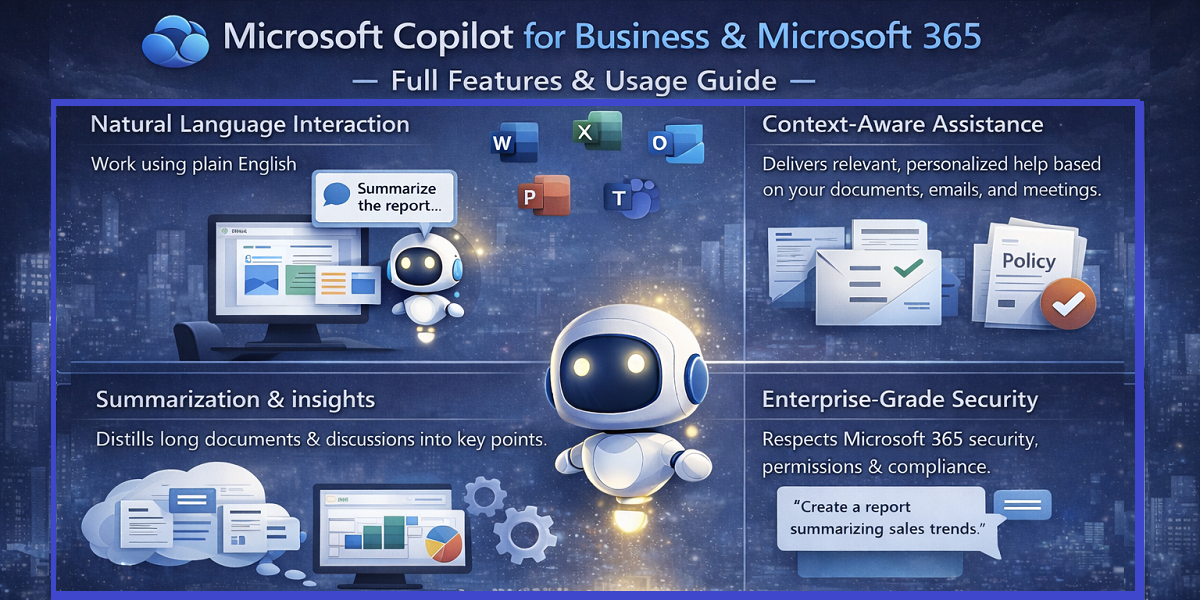
Natural Language Interaction
Copilot allows users to work using plain English (and other supported languages) instead of technical commands, formulas, or scripts.
What this enables
Users can simply ask:
“Summarize this document for leadership”. “Create a project update from last week’s emails”. “Explain this spreadsheet in simple terms”
Copilot translates everyday language into complex actions behind the scenes.
Why this matters
Eliminates steep learning curves. Makes advanced capabilities accessible to non-technical users. Reduces reliance on specialists or power users. Accelerates organization-wide adoption
Business impact:
AI becomes usable by everyone—from frontline staff to executives—without formal training or technical expertise.
Context-Aware Intelligence
Unlike generic AI tools, Copilot understands work context, not just isolated prompts.
It uses Microsoft Graph to understand:
Documents you actively work on, Meetings you attend or miss, Emails you send and receive, Your collaborators and workflows
Why this matters
Because Copilot understands what you are working on and how it connects, it can: Surface relevant information automatically, Avoid generic or disconnected responses, Provide personalized, timely assistance
Business impact:
Copilot delivers highly relevant and personalized support, helping users make better decisions faster.
Content Creation & Editing
Copilot enhances how content is created and refined—without removing human oversight.
What Copilot supports
Drafting emails, reports, proposals, and policies, Rewriting content for clarity, tone, or length, Improving consistency across teams and documents, Adapting language for different audiences
Why this matters
Employees spend significant time writing and revising content. Copilot reduces:
Time spent on first drafts, Repetitive editing and reformatting, Inconsistencies in tone and structure
Business impact:
Faster content creation, higher quality output, and reduced employee fatigue—while users retain full control over final content.
Summarization & Knowledge Extraction
Copilot excels at turning large volumes of information into actionable insights.
What Copilot can do
Summarize long documents into key takeaways, Extract decisions and action items from meetings, Highlight risks, deadlines, and priorities, Condense email threads into clear summaries
Why this matters
Manual review of documents, emails, and meeting notes:
Consumes hours of employee time, Slows decision-making, Increases the risk of missing critical information
Business impact:
Copilot saves hours of manual review and helps teams act faster with greater clarity and confidence.
Data Analysis & Visualization
Copilot brings AI-powered analytics directly into Microsoft Excel, removing traditional technical barriers.
What this enables
Asking questions about data in natural language, Automatically identifying trends, anomalies, and patterns, Explaining insights in plain business terms, Creating charts, tables, and summaries on demand
Why this matters
Data analysis is no longer limited to analysts or advanced Excel users.
Business impact:
More employees can make data-driven decisions, while analysts focus on higher-value strategic analysis instead of manual reporting.
Enterprise-Grade Security
Security and trust are foundational to Microsoft Copilot’s design. It operates entirely within Microsoft’s enterprise security framework.
Key security assurances
No cross-tenant data leakage
Organizational data is never shared across tenants or used to train public models. Permission-based access
Copilot can only access data that the user is already authorized to view.Compliance with enterprise policies
Existing security, governance, and compliance controls are fully respected.
Why this matters
Organizations can adopt AI without introducing new security risks or compliance gaps.
Business impact:
Copilot is safe to deploy at scale—even in regulated, security-sensitive environments.
Final Insight
Microsoft Copilot’s strength lies not in a single feature, but in how these capabilities work together:
Natural language makes AI accessible, Context-awareness makes it relevant, Content and analytics make it productive, Enterprise security makes it trustworthy
Together, these features position Microsoft Copilot as a core intelligence layer for modern, secure, and scalable work—not just another AI tool.
Business Benefits of Microsoft Copilot
Microsoft Copilot delivers measurable business value not by replacing people, but by removing friction from everyday work. Its benefits compound over time—improving productivity, quality, decision speed, and employee well-being across the organization.Below is a complete, point-by-point elaboration of each core benefit and its real business impact.
Productivity Gains
One of the most immediate and measurable benefits of Microsoft Copilot is significant productivity improvement across roles and departments.
How Copilot drives productivity
Copilot automates or accelerates repetitive, time-consuming tasks such as:
Drafting emails, reports, and documents
Copilot generates structured first drafts from simple prompts, eliminating blank-page effort and reducing writing time.
Summarizing long documents, meetings, and email threads
Instead of reading pages of text or long email chains, users receive concise summaries with key points and actions.
Formatting content and restructuring information
Copilot reorganizes content into clear sections, applies consistent formatting, and improves readability automatically.
Preparing presentations and data explanations
Documents and datasets are quickly transformed into slides, summaries, and explanations without manual rework.
Instead of starting from scratch or reviewing large volumes of content manually, employees begin with AI-assisted drafts and insights.
Business impact
Tasks that once took hours are completed in minutes
Employees accomplish more work within the same time frame
Teams focus on execution, delivery, and outcomes rather than preparation
Result:
Organizations achieve higher throughput and productivity without increasing headcount or workload pressure.
Improved Quality & Consistency
Beyond speed, Copilot significantly improves the quality, clarity, and consistency of business output.
How Copilot improves quality
Copilot helps organizations:
Standardize tone and language across teams
Communications follow a consistent professional style regardless of who authored them.
Apply consistent structure to documents and reports
Policies, proposals, and reports follow predictable, compliant layouts.
Reduce grammatical errors and unclear phrasing
Copilot refines language to improve clarity and professionalism.
Ensure professional formatting in communications
Documents and emails appear polished, clear, and executive-ready.
This is especially valuable where multiple teams produce customer-facing, regulatory, or leadership content.
Business impact
Documents appear more polished and credible
Messaging stays consistent across departments and regions
Less rework due to unclear or inconsistent communication
Result:
Organizations present a unified, professional voice internally and externally—strengthening trust and brand perception.
Faster Decision-Making
Modern leaders face constant information overload. Copilot directly addresses this by accelerating insight delivery.
How Copilot enables faster decisions
Copilot provides:
Instant summaries of lengthy reports and documents
Key findings and recommendations are surfaced immediately.
Clear highlights from meetings, emails, and discussions
Decisions, risks, and priorities are extracted automatically.
Plain-language explanations of data and trends
Complex analytics are translated into business-friendly insights.
Actionable insights at the right time
Leaders receive relevant information when it matters—not after the opportunity passes.
Instead of spending time gathering and reviewing information, leaders receive decision-ready insights.
Business impact
Reduced time between insight and action
Better alignment across leadership and management teams
Faster responses to risks, changes, and opportunities
Result:
Decisions are made earlier and with better context, improving agility, competitiveness, and confidence.
Reduced Burnout
Employee burnout is increasingly caused by administrative overload, not lack of skill or motivation. Copilot helps rebalance work.
How Copilot reduces burnout
By handling low-value, repetitive tasks, Copilot allows employees to:
Spend less time on manual writing and reviewing
AI assistance reduces repetitive drafting and editing work.
Avoid constant context-switching
Summaries and insights reduce the need to jump between tools and documents.
Focus on strategic, creative, and problem-solving work
Employees spend more time on meaningful, high-impact tasks.
Work becomes more purposeful and less exhausting.
Business impact
Higher employee satisfaction and morale
Lower cognitive fatigue and stress
Improved engagement and retention
Result:
Employees feel supported rather than overwhelmed, creating a healthier, more sustainable work environment.
Microsoft Copilot Licensing Explained
Understanding licensing is critical for planning AI adoption at scale and aligning cost with value.
Microsoft 365 Copilot Licensing
Microsoft 365 Copilot is typically licensed as an add-on to eligible Microsoft 365 business and enterprise plans.
How the licensing model works
Copilot is not a standalone product
It enhances existing Microsoft 365 subscriptions rather than replacing them.
Added on top of qualifying Microsoft 365 licenses
Only users with eligible plans can be enabled for Copilot.
Pricing varies by region and agreement type
Costs differ based on geography, volume, and contract structure.
Enterprise agreements may offer volume pricing
Larger organizations can negotiate scalable pricing models.
Licensing ensures full integration with:
Microsoft 365 apps (Word, Excel, PowerPoint, Outlook, Teams), Organizational security and compliance frameworks Identity and access management systems
Why this licensing approach matters
By licensing Copilot as an add-on:
Organizations control who gets AI access
AI can be enabled only for roles or teams that benefit most.
Rollouts can be phased by department or function
Adoption can scale gradually and responsibly.
Costs align with usage and business value
Investment grows alongside realized benefits.
Business impact
Predictable budgeting for AI adoption, Easier governance and access management, Faster enterprise-wide deployment once enabled
Result:
Organizations scale AI securely, responsibly, and in alignment with business priorities.
Final Perspective
Microsoft Copilot delivers value on multiple levels:
Productivity gains through automation and intelligent assistance
Higher quality and consistency across documents and communications
Faster, better-informed decisions driven by instant insights
Reduced burnout by removing low-value work
Combined with flexible, enterprise-ready licensing, Microsoft Copilot is not just an AI feature—it is a strategic investment in how modern work gets done.
Copilot Studio Licensing
Copilot Studio follows usage-based or capacity-based licensing models depending on deployment.
How to Use Microsoft Copilot Effectively (Step-by-Step Guide)
Step 1: Define Your Goal Clearly
Always specify what you want—drafting, summarizing, analyzing, or planning.
Step 2: Provide Context
Mention audience, format, tone, and constraints.
Step 3: Iterate
Refine outputs through follow-up prompts instead of accepting the first response.
Example Prompt
“Create a professional project summary for senior leadership. Keep it under 200 words. Focus on outcomes, risks, and next steps.”
Best Practices for Copilot Adoption in Businesses
Start with a pilot group
Train users on prompt writing
Define governance and data access
Measure productivity impact
Expand gradually across departments
Final Verdict: Is Microsoft Copilot Worth It for Business?
Microsoft Copilot is not just an AI add-on—it is a core productivity evolution for organizations already invested in Microsoft technologies. By embedding AI directly into everyday workflows, Copilot delivers measurable gains in efficiency, quality, and decision-making—without compromising security or compliance.
For businesses using Microsoft 365, Copilot represents one of the most practical and enterprise-ready AI investments available today.
Frequently Asked Questions (FAQs)
Microsoft Copilot is an AI-powered assistant embedded across Microsoft products that helps users write, analyze, summarize, plan, and collaborate more efficiently. It works inside familiar tools and respects enterprise security, permissions, and compliance policies.
Unlike standalone AI tools, Microsoft 365 Copilot works inside Microsoft 365 apps such as Word, Excel, PowerPoint, Outlook, and Teams. It understands work context (documents, meetings, emails) and follows organizational permissions—no copy-paste of sensitive data required.
Microsoft 365 Copilot integrates with:
Word (document drafting and editing)
Excel (data analysis and insights)
PowerPoint (presentation creation)
Outlook (email summarization and replies)
Teams (meeting summaries, decisions, and action items)
Yes. Copilot follows Microsoft’s enterprise security model:
No cross-tenant data leakage
Permission-based access (it can only see what you can see)
Compliance with enterprise policies and global standards
This makes it suitable for regulated and security-sensitive environments.
No. Microsoft Copilot augments human work rather than replacing it. It removes repetitive, low-value tasks so employees can focus on strategic thinking, creativity, and decision-making.
Copilot Studio allows organizations to build, customize, and manage their own AI copilots (agents) for specific business needs—such as HR support, IT helpdesks, onboarding, or internal knowledge assistance.
Microsoft 365 Copilot boosts individual productivity inside Microsoft apps
Copilot Studio enables process-specific AI agents for recurring organizational workflows
Together, they form a layered AI strategy: personal productivity plus operational automation.
Organizations can create copilots that:
Answer HR policy and benefits questions
Support IT troubleshooting and service requests
Guide employee onboarding
Search and summarize internal knowledge and documents