Autodesk Inventor CAM For Windows | 1 year Student License

(86 customer reviews)

Original price was: RsĀ 10,439.Current price is: RsĀ 1,540.

Buy a genuine Autodesk Inventor CAM student licence for Windows from Codesforever. Instant digital delivery—improve your design skills now!

25 Items sold in last 3 minutes
656 People watching this product now!
Description
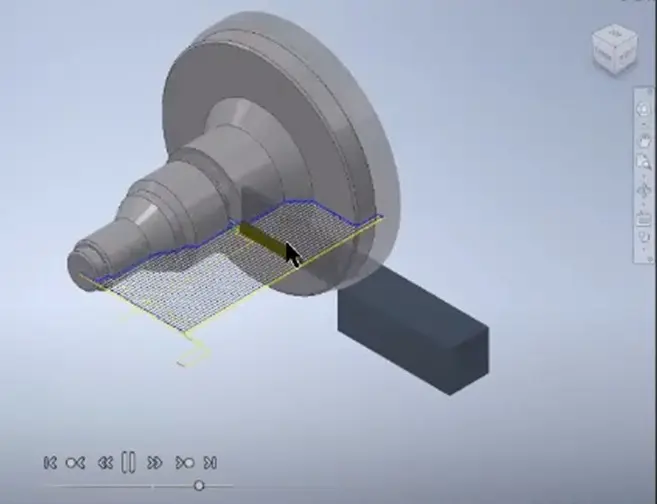
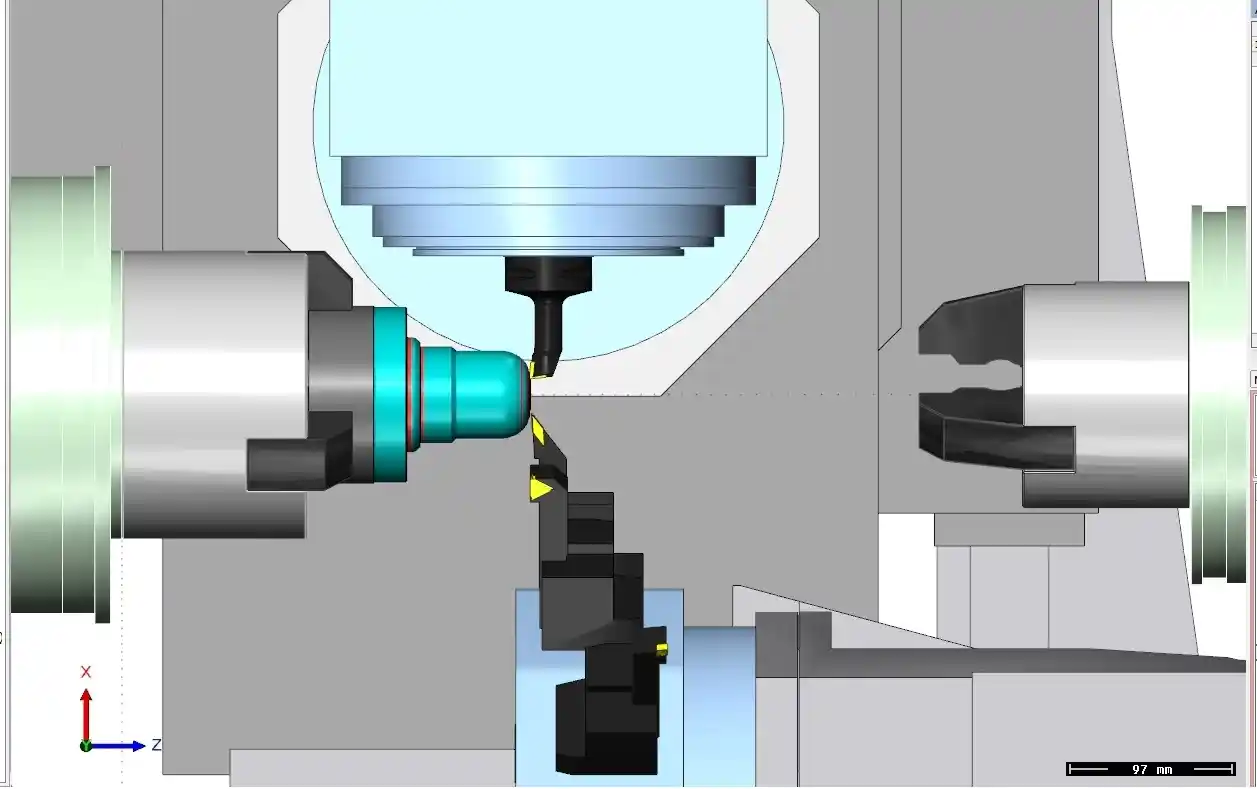
AutoCAD Inventor CAM for Windows is an essential software application for student engineers and designers who want to learn the art of computer-aided manufacturing inside the Autodesk Inventor ecosystem. This 1-year student licence is designed for academic usage and provides full access to advanced CAM functions that simplify the process of creating, simulating, and optimising machining operations and manufacturing processes. Codesforever's confirmed activation code and licence key ensure a 100% legitimate product with quick digital delivery, allowing you to start improving your skills and projects right away using industry-standard software.

Autodesk Inventor CAM allows students to effortlessly combine CAD and CAM workflows, creating precise toolpaths and accurate CNC machining simulations. The software's easy interface is intended to make learning easier, allowing you to grasp the foundations of design and manufacturing. By acquiring this student licence from Codesforever, you not only have access to premium features at a low cost, but also receive ongoing support and upgrades, which are critical for staying current in an ever-changing technical field.

Autodesk Inventor CAM For Windows

Features

Advanced CAM capabilities
Integrated Toolpaths: Autodesk Inventor CAM provides powerful tools for creating precise toolpaths, allowing for accurate simulation of machining processes.

Simulation and Verification: Use real-time simulation to visualise the manufacturing process and reduce the risk of errors before production begins.

Machining techniques can be customised to meet unique project requirements, such as adaptive clearing and high-speed machines.

Our CAD/CAM interface with Autodesk Inventor ensures a smooth transition from design to manufacturing.

Data Consistency: Maintain correctness by synchronising data between design and CAM systems, reducing human rework.

Interoperability: Easily use industry-standard file formats to assure compatibility with a variety of production machines.

User-Friendly Interface.
Simplified Interface: The software features a simple interface that allows students to easily understand and manage sophisticated CAM functionalities.

Customisable Layouts: Enhance your learning experience by personalising your workspace based on the tools and features you use the most.

Learning Resources: Integrated tutorials and help documentation help you along your educational journey, making it easy to learn advanced concepts.

Efficient Performance and Scalability
Optimised Processing: Autodesk Inventor CAM is designed to handle comprehensive simulations and sophisticated machining operations while maintaining performance.

Scalability: The programme is ideal for both academic assignments and professional workflows, and it grows with you as your skills develop.

Resource Management: Effectively manage system resources to guarantee smooth performance, even during peak operations.

Cost-effective for students.
Budget-Friendly: This student licence is priced competitively to ensure affordability without sacrificing features or performance.

Long-Term Value: A one-year licencing provides access to updates, upgrades, and continuing technical support, ensuring that your programme remains current during your study.

Autodesk Inventor CAM For Windows

Installation Guide

Step 1: Purchase and download.
Visit CodesForever: Go to the Autodesk Inventor CAM for Windows Student Licenses website.

Complete the purchase. Obtain your authentic activation code and licence key through our safe checkout process. Your product information will be given instantly via email.

Step 2: Download the installer.
Receive the download link: After purchasing, check your email for a download link.

Verify Requirements: Ensure that your computer fulfils the system requirements specified by Autodesk Inventor CAM.

Step 3: Run the installation wizard.
Launch the installer: To begin the installation procedure, simply open the downloaded file.

Follow the on-screen instructions. Accept the End-User License Agreement (EULA), then select your installation location and preferences.

Step 4: Activate the Software
Launch Autodesk Inventor CAM. Once installed, launch the software.

Enter your activation code. Enter the activation code and license key provided by Codesforever.

Verification: The software will verify your code, giving you full access to all function.

Step 5:Customize setting:Ā Customise Your Workspace Settings. Customise your workspace, tool palettes, and project options.

Test Functionality: Perform a sample simulation to confirm that all functionalities work properly.

Why Choose Codesforever?

Guaranteed authenticity.
At Codesforever, we offer 100% genuine Autodesk Inventor CAM student licenses. Every activation code and license key is rigorously tested to assure dependability and complete performance, removing the dangers associated with counterfeit software.

Competitive pricing.
Our cheap pricing offers good value to academic users. We provide excellent software at affordable prices, guaranteeing that you get the greatest tools without overspending.

Instant Digital Delivery
Receive your activation code promptly via digital download, allowing you to get started on your projects right now.

Excellent customer support.
Our professional support team is available around the clock to help you with installation, activation, and troubleshooting issues. We take pleasure in providing timely, competent service that ensures a smooth experience.

Continuous Updates and Long-Term Value
Your student licence includes all future updates and security patches, ensuring that your software remains current and meets your changing academic requirements.

Ā 

FAQ

Is this a genuine Autodesk Inventor CAM student licence?

Yes, every activation code and licence key from Codesforever is 100% genuine and verified.

How quickly will I receive my activation code?

Your activation code is delivered instantly via email after your purchase.

Can I install Autodesk Inventor CAM on multiple devices?

This licence is intended for one PC only. For additional installations, please contact our sales team.

What if I encounter issues during installation or activation?

Visit our Support page or contact our customer service for prompt assistance.

Autodesk Inventor CAM for Windows is an essential tool for students who want to excel in 2D and 3D manufacturing design. With extensive simulation features, a user-friendly interface, and seamless connection with Autodesk Inventor, this software enables you to master critical design and production procedures. By acquiring your genuine activation code and licence key from Codesforever, you get immediate digital delivery, low pricing, and dependable customer service, ensuring a smooth transition into professional-grade CAD/CAM environments.

Take your engineering projects to the next level using Autodesk Inventor CAM. Purchase your student license from Codesforever today and maximize the potential of computer-aided manufacturing design.

Please note here in above article term "activation code , license key" means email license i.e (we will assign license to your email id) will be given . For more detail refer "Must Read" Tab.

Additional information
Select Autodesk Version2024, 2025, 2026, 2027
Select Year1 Year
Reviews (86)

86 reviews for Autodesk Inventor CAM For Windows | 1 year Student License

1-5 of 86 reviews
  1. I needed good CAD at a good price and found these guys, Then managed to make a mistake on ordering but got in touch and was sorted out very kindly by the team which takes time and patience on their side to end up with the right product. I have not been with them before so can honestly say they are very good.

  2. Great buying from you as always. I bought many from your store before. Recommended seller for authorized product keys.

  3. Their support to their products and clients is first class.

  4. Quick and Effective support

  5. Doing Business more than 4 year.. very Happy customer

Add a review
Currently, we are not accepting new reviews
Must-Read Before Purchasing Our Software
  • If you have any questions, feel free to contact us by WhatsApp or Write to us at: [email protected] delivery all details are sent via Email Only. No physical delivery.
    The product is for one (1) device only. This is a 100 % Original Product.Delivery may take Up 0 to 24Hrs time Maximum, but generally, we deliver in less time .
    This is 1 year subscription work on all edition from 2023 to 2027.

    For any Query Regarding the previous edition (OLD version)
    (2023, 2022, 2021, 2020, 2024,2025 etc.) for all products of Autodesk (AutoCAD, Revit, 3D Max, etc.). Kindly WhatsApp or email. It is an educational version, complete with full functionality. All features unlocked

    The product has no brand name watermark, with no reference to the educational wording of the documents.For Commercial Version Click here - https://codesforever.com/autodesk-commercial/